When people picture a cloud hack, they imagine an attacker who defeats Amazon’s or Google’s own defenses, and that scenario stays rare. Attackers take a much shorter path, because they scan for the settings you left open and they usually find a few. The Cloud Security Alliance ranks misconfiguration and inadequate change control as the number one threat to cloud computing, above zero-day attacks.
The providers secure the platform, you secure what you build on it, and almost every incident lives on your side of that line. If you want to practice on real AWS and GCP configurations, the Cloud & Kubernetes Security Practitioner (cCKSP) by CyberEDU puts you in a lab where you can break things safely.
What a cloud misconfiguration looks like in practice
Imagine an engineer who attaches an admin policy to a service role at 6 PM, because the deployment fails again and the sprint ends tomorrow. The team agrees to scope it down next week, and nobody reopens that ticket.
Or, perhaps, someone opens a database port to the whole internet for a client demo, the demo goes well, and the rule stays exactly where it is.
Or, maybe, a developer drops a service account key into a config file, and months later the team publishes that repository, so the key travels along with it.
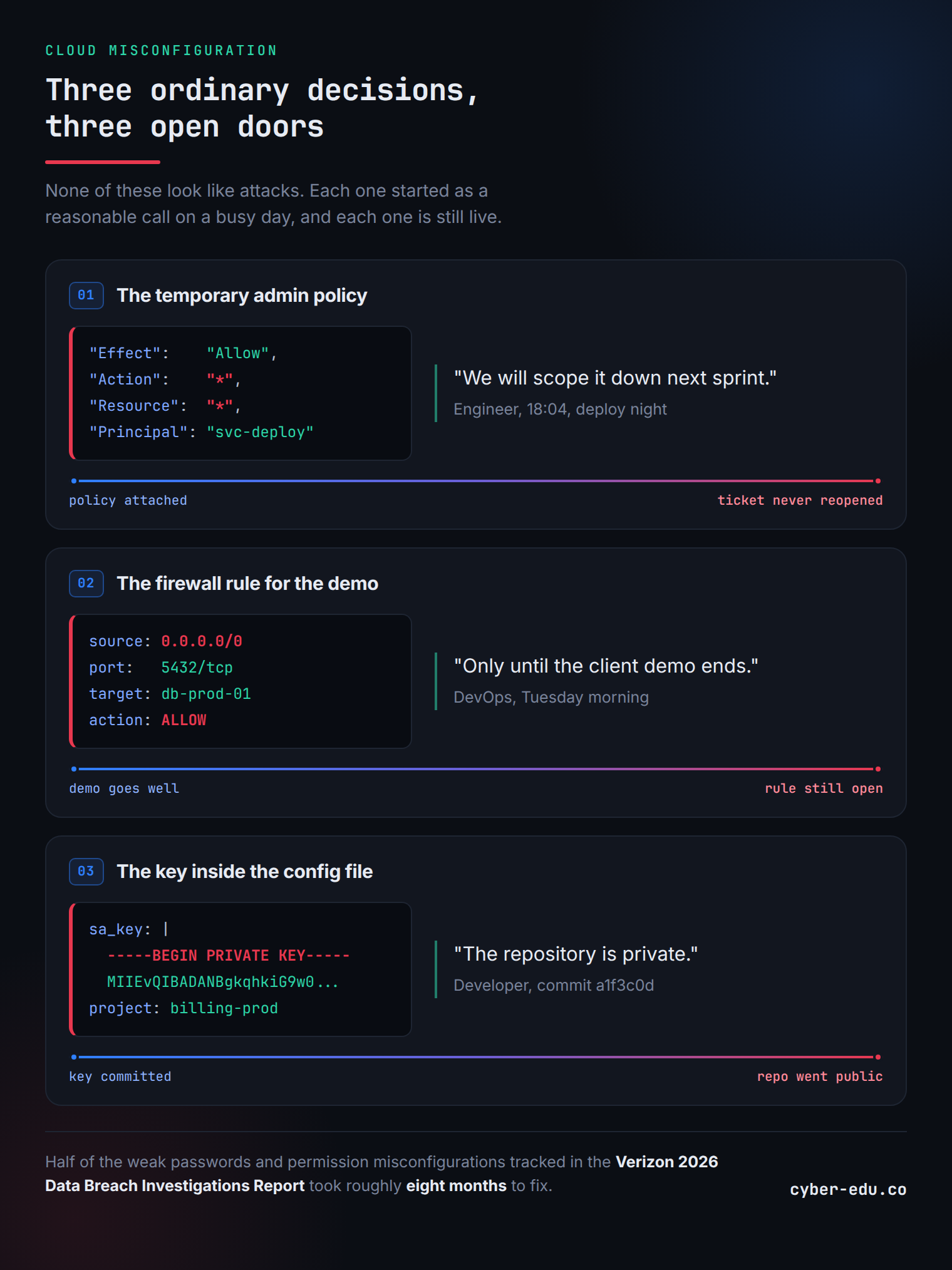
None of these look like attacks, because they look like an ordinary Tuesday. The Verizon 2026 Data Breach Investigations Report puts a number on the habit, since half the weak passwords and permission misconfigurations it tracked took roughly eight months to fix, and an attacker who finds one works much faster than that.
The shared responsibility model decides who fixes what
Both providers publish a shared responsibility model. Under the AWS version and the Google Cloud version, the provider secures the cloud itself, which covers the data centers, the hardware, and the core network, while you secure what you run inside it, which covers your accounts, your storage, your access rules, and your workloads.
The split sounds obvious, and it still explains most incidents, because a provider can build a perfect vault and it will not matter if you prop the door open.
The four places cloud misconfigurations happen
Identity. IAM decides who can do what, and it governs your whole environment, down to the resources that never touch a login screen. Broad permissions take a minute to grant and an afternoon to scope correctly, so teams grant them broadly and promise themselves a cleanup. One over-permissive role, one access key that never expires, or one trust relationship between accounts turns a small foothold into a full takeover, which is why AWS puts least privilege and short-lived credentials at the top of its security best practices for IAM.
Storage. Amazon S3 and Google Cloud Storage buckets start private, and one misapplied policy or one temporary public link that nobody revokes exposes customer records, backups, or source code. Automated scanners sweep the internet for exactly this, and they move fast.
Networking. Security groups and firewall rules decide which ports the internet can reach, and databases, admin panels, and development servers end up exposed because one person needed access once and nobody closed the rule afterwards.
Secrets. Applications need database passwords, API keys, and tokens, and teams routinely hardcode them into source or park them in config files. AWS Secrets Manager, AWS KMS, and Google Secret Manager exist for this exact problem, and they protect the teams that actually adopt them.
The NSA covers the same ground in its Top Ten Cloud Security Mitigation Strategies, and that document reads like a checklist built around these four categories.
How attackers chain small mistakes into a breach
Real cloud attacks run in stages, and MITRE ATT&CK names each one.
First, attackers map the ground, and they enumerate what an account exposes and what the storage holds (Cloud Infrastructure Discovery, Data from Cloud Storage). Then they get in, usually through a leaked key or an exposed service that somebody forgot about (Valid Accounts). Then they climb, because they list the permissions they inherited and hunt for a path to administrator (Permission Groups Discovery).
Each mistake looks minor on its own, and attackers combine three minor ones into a single serious incident, which is why your smallest findings deserve attention first.
Google Cloud uses different names for the same problems
Everything above applies to Google Cloud, where the vocabulary changes and the mechanics stay identical. GCP organizes accounts through a resource hierarchy of organization, folders, and projects, and it grants permissions through IAM roles. Compute Engine and Cloud Functions carry the same risks, which are service accounts with too much power, exposed metadata, and public resources that nobody meant to publish.
Learn the AWS patterns and GCP will cost you a new vocabulary on top of a mental model you already own.
Five cloud security checks you can run this week
- Search your IAM roles and policies for wildcards, and start with whatever production actually uses.
- Confirm that public access block covers every storage bucket, then justify each exception out loud.
- Filter your firewall rules for anything open to the whole internet, and check the databases first.
- Scan your repositories for committed secrets, because free tools finish this job in minutes.
- List your long-lived access keys and service account keys, then rotate or delete whatever nobody has touched in months.
Each check takes under an hour, and each one finds something worth fixing. Automated pipeline checks catch many of these problems before they ever reach production, which is the argument we made in DevSecOps automation: why you can’t scale CI/CD security without it, and these five catch whatever already runs.
READY TO SECURE AWS AND GCP ENVIRONMENTS IN PRACTICE?
 The cCKSP program by CyberEDU teaches you to read and fix real cloud configurations, and you build that judgment through repetition in a lab.
The program runs 12 modules in a dedicated cloud lab, where you work through IAM roles and policies, networking, storage, and secrets management across AWS and GCP.
Then you switch sides, and the offensive labs put you in the attacker’s seat, where you hunt exposed public resources and walk real privilege-escalation paths yourself.
Prerequisites stay low on purpose, because basic IT knowledge, basic networking fundamentals, and comfort with the Linux CLI get you through the door.